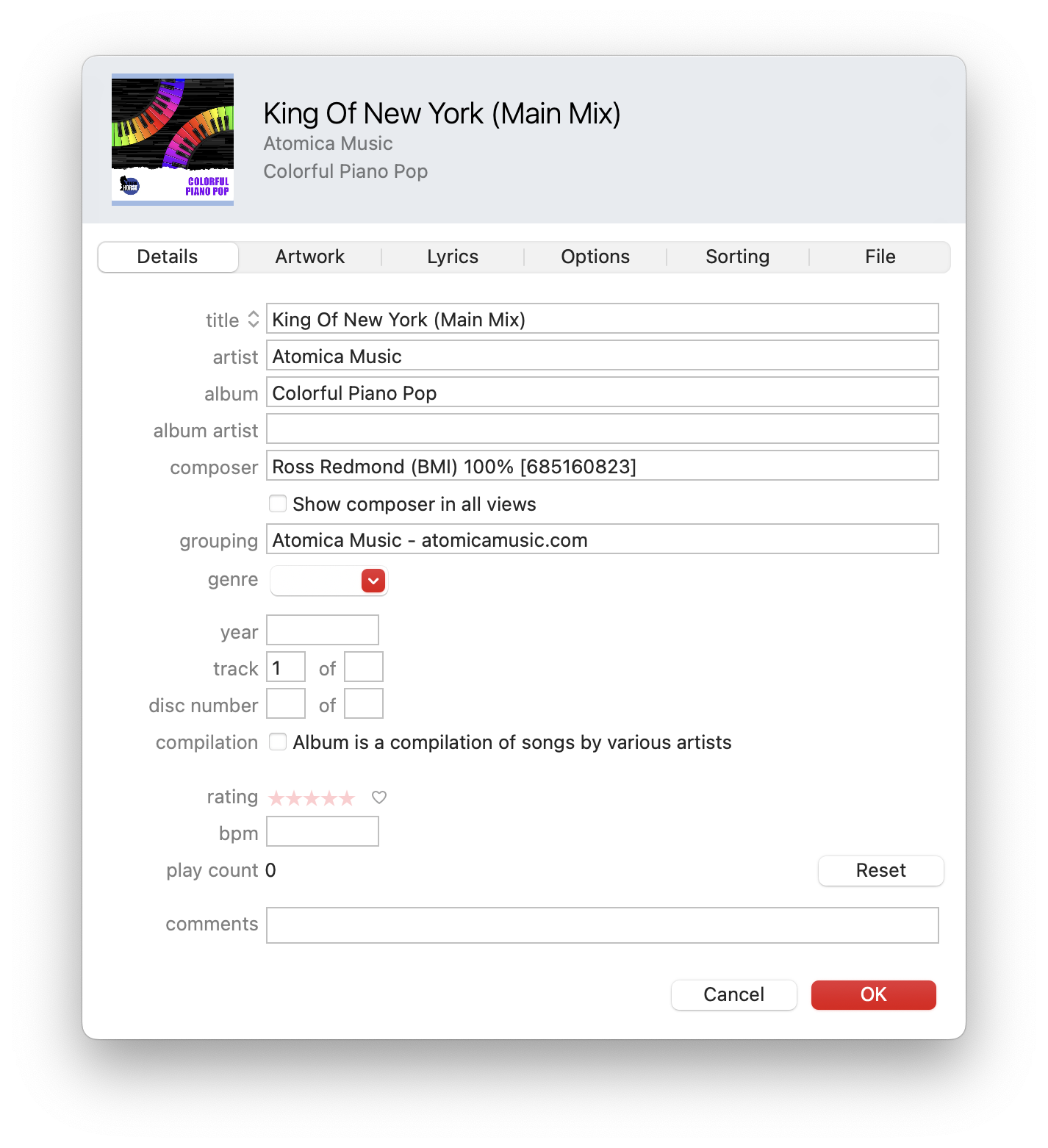
When trying to review metadata, using Apple Music’s “Get Info” window (or similar consumer focused apps) is not ideal as this will only let you preview a subset of the metadata available in a file.
In the case of WAV files, Apple Music doesn’t support reading metadata at all.
The following apps, although archaic, allow you to view music metadata embedded in files in detail.
ID3 is a metadata container allowing information such as the title, artist, album, track number, and other information about the file to be stored in the file itself.
Supported ID3 tags
Here are the fields we automatically add to each track when it is downloaded.
// Track title"TIT2": title,// Track description"COMM": description,// Track_number"TRCK": track_number,// Genre (from any genre tags present)"TCON": genre,// ISRC"TSRC": isrc,// Composer(s) - Composer name (PRO) 100% [IPI]"TCOM": composers,// BPM"TBPM": track_bpm// Album title"TALB": release_title,// Album sleeve"APIC": packshot// Original release year"TORY": release_year// Publisher - Publisher name (PRO) [IPI]"TPUB": publisher,// Copyright - 2015 Publisher name (PRO) [IPI]"TCOP": `${release_year} ${publisher}`,// Artist - we add the label name (Library Name in the CSV)"TPE1": label_name,// Auto grouping// Contact info of your choice - to add please contact support"GRP1": contact_info,// Metadata encoder"TENC": "Cadenzabox",
A medium resolution JPEG of the cover artwork of the track’s parent release is added to the APIC ID3 tag for visibility in the macOS Finder / Windows File Explorer / Apple Music, etc.
Here is an example of how our supported fields look in the “Get Info” window in Apple Music:
Poor ID3 standardisation
ID3 tags are an poorly defined format, with competing usages of the different fields.
Alongside many extended discussions with a variety of Cadenzabox clients, here are some resources we have referenced when deciding how to structure our system’s use of the available fields:
For example, we currently don’t support the following fields:
// Grouping - unsupported"TIT1": null// Recording time - unsupported"TDRC": null,// File owner - unsupported"TOWN": null,// Album artist - unsupported"TPE2": null,// Original release time - unsupported"TDOR": null,
Please contact us if you have a metadata request or suggestions on how we might better align ourselves in the sea of subtly conflicting usage standards. 🌊
WAV files — ID3 + RIFF
Broadcast Wave Format (BWF) is an extension of the Waveform Audio File Format (WAV or WAVE) to allow the addition of metadata. This metadata is stored as extension chunks in a standard digital audio WAV file.
WAV is an application of the Resource Interchange File Format (RIFF) bitstream format method for storing data in chunks, similar to the Audio Interchange File Format (AIFF) format.
ID3 tags
Cadenzabox embeds ID3 tags when exporting WAV files. These can be read using a professional ID3 metadata tool.
Please note that Apple Music doesn’t support reading ID3 tags from WAV files, even when they are present. Thankfully macOS does at least create an icon in the Finder using the album packshot (the APIC ID3 field).
RIFF chunks
We clear all metadata and add the following when exporting WAV files from Cadenzabox.
Resource Interchange File Format headers comprise the following fields:
// Track number"TRCK": track_number,// Track title (bracketed version title followed if present)"INAM": title,// Genre(s) - comma delimited tags from Genre/Genres tag-categories"IGNR": genre,// Track artist"IART": org_name,// Composers - Composer name (PRO) 100% [IPI]"IMUS": composers,// Comments"ICMT": description,// Album title"IPRD": release_title,// Release date"ICRD": release_date,// Copyright - Publisher name (PRO) [IPI]"ICOP": copyright,// Software - metadata encoder"ISFT": "Cadenzabox",// Description - track description, falls back to the organisation name"bext": description || org_name,// XMP file - detailed below"_PMX": xmp_file,// aXML file - detailed below"axml": axml_file,// iXML file - currently unsupported"iXML": null,
XMP chunk
Extensible Metadata Platform (XMP) headers comprise the following fields: